

Est. time: ~45–60 min
New terms (Module 3)
Your job in this module
- Pass Module 2 on the stock
- Use the Wheel page to compare puts and reject most of them
- Run the checklist below
- Place at most one trade at your broker (or zero)
1. Wheel page orientation
Treat the Wheel page as a research cockpit:- Candidates after your filters
- Visual comparison of return vs assignment risk
- Structure overlays (score, GEX, walls) in the side panel
- Shortlist → one order at your broker (off-platform)
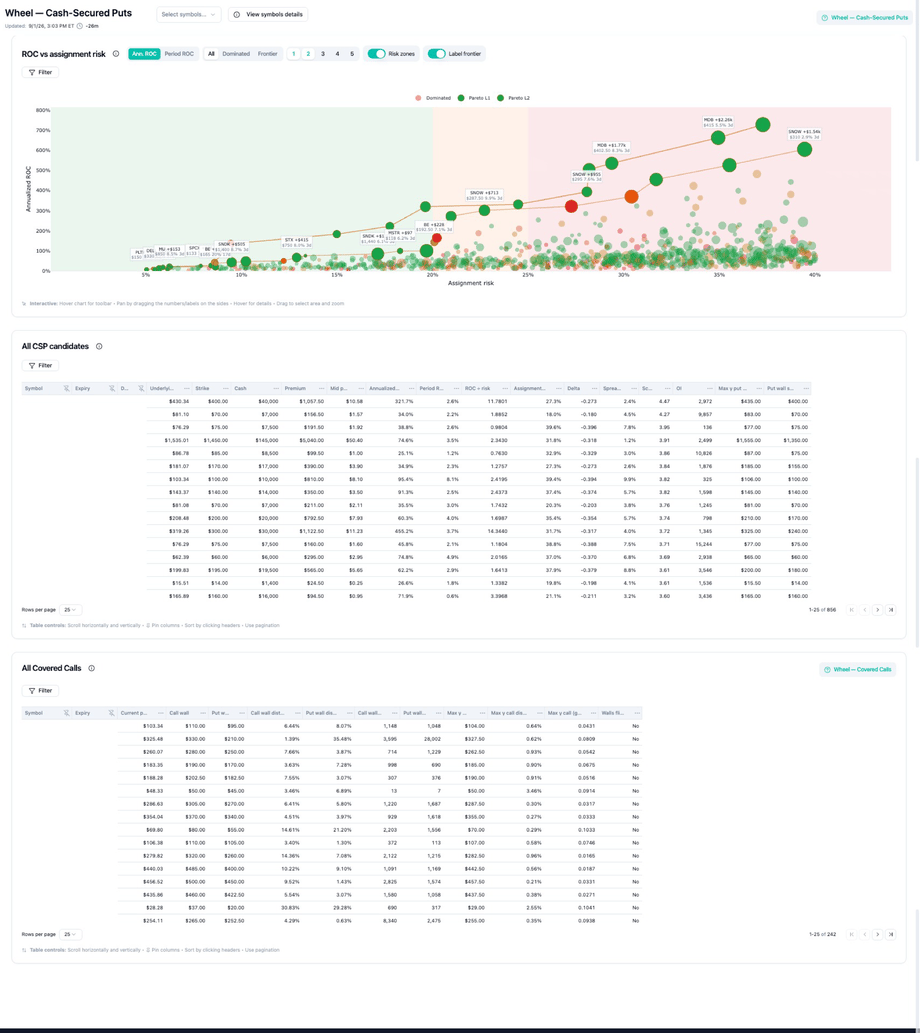
2. ROC vs assignment-risk scatter
Each dot is a candidate contract (strike + expiry) that passed basic filters.
Skill: do not maximize ROC blindly. High ROC + high assignment risk on a name you barely want to own is a Module 2 fail—even if the dot looks attractive.
- Up = more return on your cash
- Right = more assignment risk
- Pink / dominated = reject
- Green frontier = compare these only
3. The Pareto frontier
Candidate A dominates B if A is better on ROC and no worse on assignment risk (or better on risk and no worse on ROC)—so B is strictly worse on the trade-off you care about. The Pareto frontier is the set of non-dominated candidates—the efficient edge of the cloud.- Points inside the cloud are often dominated → easy rejects
- Points on the frontier deserve comparison—not automatic entry
4. Score — what it is and how to read it
Score highlights where market focus and participation are intense—it is not whether a trade is “good.”- Higher score → more attention / positioning at that level
- Use it to notice engagement, then apply Module 2 ownability and liquidity rules
- Experimental and relative—see What is Score?
5. Dealer positioning / GEX
Dealer hedging can dampen (often with positive GEX) or amplify (negative GEX) moves. For wheel research:- Calmer dealer backdrop → short premium may be easier to manage (still not safe)
- Stress / negative GEX → rich premium can be a warning, not a gift
6. Walls and magnets
Walls are not guarantees. They are structure labels for discrimination.
Related: GEX weight distribution · Wheel — Covered calls.
7. Filters
Use filters to enforce Module 2 policy before you fall in love with a credit. Full recipes: Filtering the Wheel page.
Example session:
8. End-to-end workflow
9. Pre-trade checklist (printable)
- Name I’d hold? Willing to own through a serious drawdown at this strike
- Liquid enough? OI / spread acceptable vs credit
- Event policy OK? Earnings / binary not ignored
- ROC / risk on frontier? Not a dominated interior point
- Score used correctly? Focus only—not a buy signal
- GEX / regime acceptable? Not ignoring stress because premium is rich
- Size within cap? Per-ticker and portfolio limits
- Live broker confirm? Prices, margin, order details verified
10. Worked example — compare 3, reject 2
Pick three dots from your filtered scatter—A, B, C.
Target: one keep or zero. Write two reject reasons, e.g.:
- “Reject B—dominated; worse risk for less ROC.”
- “Reject C—famous name, but I won’t hold through this event regime.”
Checkpoint
- I can explain dominated vs frontier in one minute
- I rejected ≥2 candidates in one live session
- I used the Wheel Page Guide beside the app
- Ready for Module 4 paper capstone