> ## Documentation Index
> Fetch the complete documentation index at: https://docs.bigdipperoptions.com/llms.txt
> Use this file to discover all available pages before exploring further.
# Wheel Page Guide
> How to use the Wheel — Cash-Secured Puts page: purpose of each view, filters, scatter, tables, and how wheel traders use them.
The **Wheel** page is where you **compare** cash-secured put (CSP) candidates on BigDipperOptions. It does **not** place trades—you narrow to one (or zero) ideas, then confirm **live underlying and option premium** at your broker.
Use this guide alongside the **Learn** wheel track: screening rules in [Module 2](/learn/wheel-module-2-candidates), reject drill and checklist in [Module 3](/learn/wheel-module-3-execution), lifecycle in [Module 4](/learn/wheel-module-4-lifecycle).
**Prices on charts are 15-minute delayed** and fetched regularly. Confirm live underlying and option prices at your broker before trading. See [Delayed Data Disclaimer](/learn/delayed-data-disclaimer).
***
## What this page is for
| Question the page helps answer | Where on the page |
| - | - |
| “Among names I’d own, which puts offer the **best return for the assignment risk** I accept?” | ROC vs assignment risk scatter |
| “What are the **exact strikes, credits, and capital** for my shortlist?” | All CSP candidates table |
| “After assignment, where might I **sell covered calls** with structure context?” | All Covered calls table |
The page is built for **comparison and rejection**—not for picking the highest ROC dot and trading it blindly. Your [Module 2](/learn/wheel-module-2-candidates) ownability and liquidity rules still gate every decision.
***
## Open the page
1. Log in at [bigdipperoptions.com](https://bigdipperoptions.com).
2. From the top menu, open **Charts** → **Wheel — Cash-Secured Puts** (wording may vary slightly in the app).
3. You land on the page title **Wheel — Cash-Secured Puts**.
For login and the **Options Chain Report**, see [Using BigDipperOptions](/learn/using-bigdipperoptions) and [Navigation tips](/dashboard/navigation-tips).
***
## Full page overview
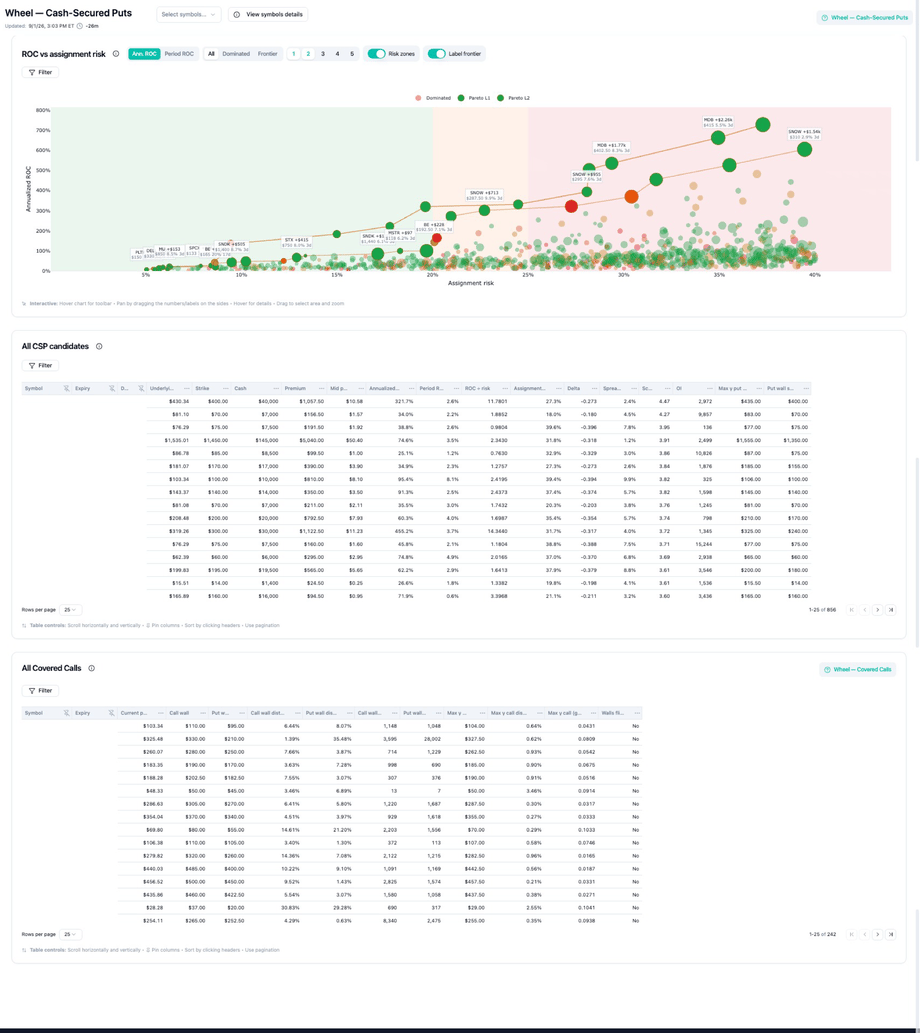 | Block | Purpose | Typical usage in a wheel session |
| - | - | - |
| **Select symbols…** (header) | Limit **which tickers** appear on the page | Pick your Module 2 watchlist before touching chart filters |
| **Scatter Filter** (funnel on chart) | Narrow **which contracts** show as dots and table rows | Set DTE, cash, ROC, assignment risk, premium, score bands |
| **Scatter view toggles** | Change **how** you read the chart (not what data exists) | Ann./Period ROC, Frontier layers, risk zones, labels |
| **ROC vs assignment risk** | See **efficiency trade-offs** across many candidates at once | Reject dominated dots; pick 2–3 frontier finalists to drill into |
| **All CSP candidates** | **Verify numbers** (credit, cash, delta, spread, OI) for finalists | Sort, pin columns, compare side by side before broker quote check |
| **All Covered calls** | **Plan Phase B** after you hold shares | Use after assignment or when pre-planning “if I get assigned here…” |
**Suggested order:** **Select symbols** → **scatter Filter** → frontier view → **hover** tooltips → **click** side panel (reject symbols) → **CSP table** → broker.
***
## Page header
| Block | Purpose | Typical usage in a wheel session |
| - | - | - |
| **Select symbols…** (header) | Limit **which tickers** appear on the page | Pick your Module 2 watchlist before touching chart filters |
| **Scatter Filter** (funnel on chart) | Narrow **which contracts** show as dots and table rows | Set DTE, cash, ROC, assignment risk, premium, score bands |
| **Scatter view toggles** | Change **how** you read the chart (not what data exists) | Ann./Period ROC, Frontier layers, risk zones, labels |
| **ROC vs assignment risk** | See **efficiency trade-offs** across many candidates at once | Reject dominated dots; pick 2–3 frontier finalists to drill into |
| **All CSP candidates** | **Verify numbers** (credit, cash, delta, spread, OI) for finalists | Sort, pin columns, compare side by side before broker quote check |
| **All Covered calls** | **Plan Phase B** after you hold shares | Use after assignment or when pre-planning “if I get assigned here…” |
**Suggested order:** **Select symbols** → **scatter Filter** → frontier view → **hover** tooltips → **click** side panel (reject symbols) → **CSP table** → broker.
***
## Page header
 ### Purpose
Orient you on **which wheel phase** you are in (CSP / Phase A), **how fresh** the data is, and **which symbols** are in scope.
### Potential usage
| Element | Use it when… |
| - | - |
| **Wheel — Cash-Secured Puts** | You are researching **new short puts**—not managing an existing covered call (see Covered calls table for Phase B). |
| **Updated timestamp** | You need to know if delayed data is stale before comparing to a **live broker quote**. Re-check after long breaks. |
| **Select symbols…** | You have a **watchlist** from Module 2 (e.g. 5–15 ownable names) and want the page focused on those—not the full market. |
| **View symbols details** | You want quick context on selected tickers before opening the chain report. |
| **Clear filters** | You changed policy mid-session and need to reset scatter Filter conditions |
***
## Filtering the Wheel page
Open **Filter** on the scatter chart (funnel icon). Conditions apply to **both** dots and the CSP table. Scope tickers first in **Select symbols…**, then stack chart filters.
### Purpose
Orient you on **which wheel phase** you are in (CSP / Phase A), **how fresh** the data is, and **which symbols** are in scope.
### Potential usage
| Element | Use it when… |
| - | - |
| **Wheel — Cash-Secured Puts** | You are researching **new short puts**—not managing an existing covered call (see Covered calls table for Phase B). |
| **Updated timestamp** | You need to know if delayed data is stale before comparing to a **live broker quote**. Re-check after long breaks. |
| **Select symbols…** | You have a **watchlist** from Module 2 (e.g. 5–15 ownable names) and want the page focused on those—not the full market. |
| **View symbols details** | You want quick context on selected tickers before opening the chain report. |
| **Clear filters** | You changed policy mid-session and need to reset scatter Filter conditions |
***
## Filtering the Wheel page
Open **Filter** on the scatter chart (funnel icon). Conditions apply to **both** dots and the CSP table. Scope tickers first in **Select symbols…**, then stack chart filters.
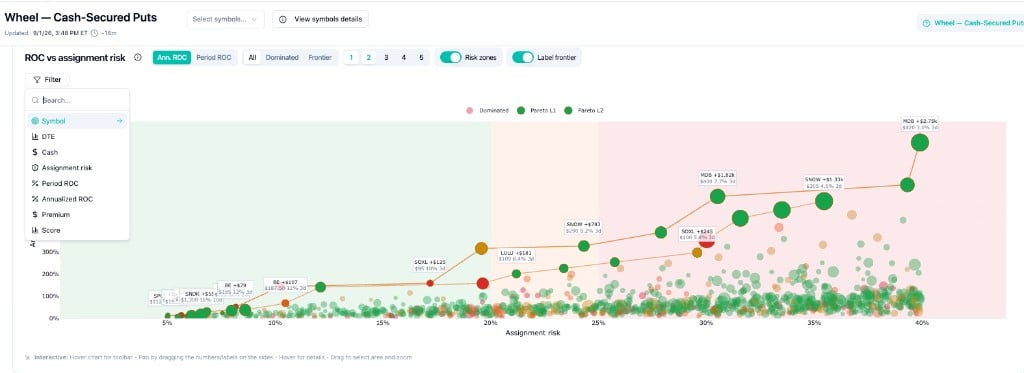 Each example below is a filter stack you can type into the menu. **Search** inside Filter jumps to a field when you add several at once.
**Start here:** [Conservative income (full stack)](#conservative-income-full-stack) — then adjust one field at a time.
### Scope the universe (header)
You already passed [Module 2](/learn/wheel-module-2-candidates) ownability—don't let a high-ROC dot on a bad name tempt you.
```text theme={null}
Select symbols… → AAPL, MSFT, KO, PEP, JNJ
```
**Result:** Scatter and table only show your watchlist. Everything else is out of scope before you touch Filter.
***
### Weekly wheel — only short-dated puts
You want to manage every Friday, not babysit a 45 DTE line for a month.
```text theme={null}
DTE → 7 – 14
```
**Result:** Dots cluster for near-term expiries; long-dated "set and forget" ideas disappear.
***
### Cap collateral per contract
Your rule: no single CSP above \$8,500 cash at risk (e.g. \~10% of an \$85k wheel sleeve).
```text theme={null}
Cash → ≤ 8,500
```
**Result:** High-strike / high-notional names drop out even if ROC looks attractive.
***
### Stay left on assignment risk
You prefer premium income, not surprise share delivery.
```text theme={null}
Assignment risk → ≤ 22%
```
Turn on **Risk zones** on the chart. Dots should sit in the green band; orange/pink zones are for names you **want** to own at strike.
***
### Floor return for *this* expiry (Period ROC)
You won't sell a 21 DTE put for less than 1% on cash for the cycle.
```text theme={null}
Period ROC → ≥ 1.0%
```
Set the chart Y-axis to **Period ROC** so the visual matches the filter.
***
### Compare different DTEs (Annualized ROC)
You're mixing 10 DTE and 35 DTE dots and need a common yardstick.
```text theme={null}
Annualized ROC → ≥ 20%
```
Set the chart Y-axis to **Ann. ROC**. A 0.8% week can beat a 1.2% month on an annualized basis—or not; the filter surfaces that.
***
### Skip credits eaten by spread and fees
\$45 premium on a wide name isn't worth the ticket.
```text theme={null}
Premium → ≥ 180
```
**Result:** Small-dollar dots vanish; what remains is worth opening the broker quote.
***
### Tie-break among frontier dots (Score)
Two L1 frontier puts look similar on ROC and risk.
```text theme={null}
Score → < 2
```
Use **Frontier** + **Label frontier** first, then add Score. Score is a **decimal**—see [What is Score?](/introduction/what-is-score#score-scale) for scale, bands, and heatmap examples. Then confirm **live IV and quotes at your broker** before you trade.
***
### Head-to-head: two finalists
You've scanned the cloud; only AAPL and MSFT remain ownable.
```text theme={null}
Symbol → AAPL, MSFT
DTE → 28 – 35
Assignment risk → ≤ 28%
Period ROC → ≥ 0.9%
```
**Result:** A tight compare set—pick one row in the CSP table, reject the other.
***
### Conservative income (full stack)
Typical "monthly wheel, don't get assigned casually" session:
```text theme={null}
Select symbols… → (your Module 2 list)
DTE → 21 – 45
Cash → ≤ your per-ticker cap
Assignment risk → ≤ 25%
Period ROC → ≥ 1.0%
Premium → ≥ 150
```
Then: **Frontier** → **Label frontier** → CSP table → sort **Spread %**, **OI**, **Delta** → broker.
Zero dots after filtering is a valid outcome. Widen Module 2 or wait—don't loosen **Assignment risk** or **Cash** just to force a trade.
### Chart toggles (not filters)
These change how you **read** the same filtered data:
| Toggle | Pair with |
| - | - |
| **Ann. ROC / Period ROC** | Matching ROC filter above |
| **Frontier** / **Dominated** | Shortlist before opening the table |
| **Risk zones** | **Assignment risk** filter |
| **Label frontier** | Final 2–3 symbols |
The CSP table **Filter** button narrows rows after you pick a dot—use it when the side panel helped you reject a symbol but you still want to compare other strikes in the table.
***
## ROC vs assignment risk (scatter)
Each example below is a filter stack you can type into the menu. **Search** inside Filter jumps to a field when you add several at once.
**Start here:** [Conservative income (full stack)](#conservative-income-full-stack) — then adjust one field at a time.
### Scope the universe (header)
You already passed [Module 2](/learn/wheel-module-2-candidates) ownability—don't let a high-ROC dot on a bad name tempt you.
```text theme={null}
Select symbols… → AAPL, MSFT, KO, PEP, JNJ
```
**Result:** Scatter and table only show your watchlist. Everything else is out of scope before you touch Filter.
***
### Weekly wheel — only short-dated puts
You want to manage every Friday, not babysit a 45 DTE line for a month.
```text theme={null}
DTE → 7 – 14
```
**Result:** Dots cluster for near-term expiries; long-dated "set and forget" ideas disappear.
***
### Cap collateral per contract
Your rule: no single CSP above \$8,500 cash at risk (e.g. \~10% of an \$85k wheel sleeve).
```text theme={null}
Cash → ≤ 8,500
```
**Result:** High-strike / high-notional names drop out even if ROC looks attractive.
***
### Stay left on assignment risk
You prefer premium income, not surprise share delivery.
```text theme={null}
Assignment risk → ≤ 22%
```
Turn on **Risk zones** on the chart. Dots should sit in the green band; orange/pink zones are for names you **want** to own at strike.
***
### Floor return for *this* expiry (Period ROC)
You won't sell a 21 DTE put for less than 1% on cash for the cycle.
```text theme={null}
Period ROC → ≥ 1.0%
```
Set the chart Y-axis to **Period ROC** so the visual matches the filter.
***
### Compare different DTEs (Annualized ROC)
You're mixing 10 DTE and 35 DTE dots and need a common yardstick.
```text theme={null}
Annualized ROC → ≥ 20%
```
Set the chart Y-axis to **Ann. ROC**. A 0.8% week can beat a 1.2% month on an annualized basis—or not; the filter surfaces that.
***
### Skip credits eaten by spread and fees
\$45 premium on a wide name isn't worth the ticket.
```text theme={null}
Premium → ≥ 180
```
**Result:** Small-dollar dots vanish; what remains is worth opening the broker quote.
***
### Tie-break among frontier dots (Score)
Two L1 frontier puts look similar on ROC and risk.
```text theme={null}
Score → < 2
```
Use **Frontier** + **Label frontier** first, then add Score. Score is a **decimal**—see [What is Score?](/introduction/what-is-score#score-scale) for scale, bands, and heatmap examples. Then confirm **live IV and quotes at your broker** before you trade.
***
### Head-to-head: two finalists
You've scanned the cloud; only AAPL and MSFT remain ownable.
```text theme={null}
Symbol → AAPL, MSFT
DTE → 28 – 35
Assignment risk → ≤ 28%
Period ROC → ≥ 0.9%
```
**Result:** A tight compare set—pick one row in the CSP table, reject the other.
***
### Conservative income (full stack)
Typical "monthly wheel, don't get assigned casually" session:
```text theme={null}
Select symbols… → (your Module 2 list)
DTE → 21 – 45
Cash → ≤ your per-ticker cap
Assignment risk → ≤ 25%
Period ROC → ≥ 1.0%
Premium → ≥ 150
```
Then: **Frontier** → **Label frontier** → CSP table → sort **Spread %**, **OI**, **Delta** → broker.
Zero dots after filtering is a valid outcome. Widen Module 2 or wait—don't loosen **Assignment risk** or **Cash** just to force a trade.
### Chart toggles (not filters)
These change how you **read** the same filtered data:
| Toggle | Pair with |
| - | - |
| **Ann. ROC / Period ROC** | Matching ROC filter above |
| **Frontier** / **Dominated** | Shortlist before opening the table |
| **Risk zones** | **Assignment risk** filter |
| **Label frontier** | Final 2–3 symbols |
The CSP table **Filter** button narrows rows after you pick a dot—use it when the side panel helped you reject a symbol but you still want to compare other strikes in the table.
***
## ROC vs assignment risk (scatter)
 ### Purpose
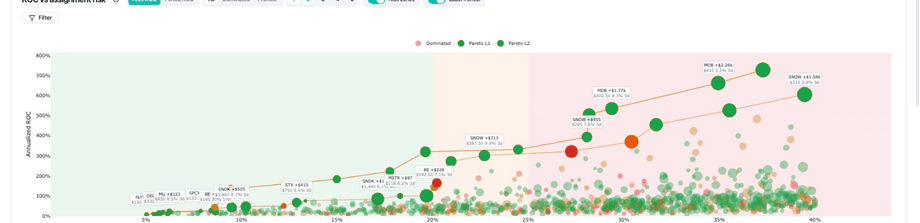
Give a **bird’s-eye view** of the premium-efficiency vs assignment-risk trade-off across every CSP that passed your filters. The scatter is for **elimination and shortlisting**, not for precise order entry.
**Core wheel tension it visualizes:** more premium (higher ROC) often comes with **more assignment risk**—i.e. a higher chance you end up owning shares at that strike.
### Period ROC vs annualized ROC
On the Wheel page, **ROC** measures **premium income vs cash secured** for a **single cash-secured put** (Phase A)—not your full wheel P\&L after assignment, covered calls, or stock moves.
| Metric | What it answers | Formula (conceptual) |
| - | - | - |
| **Period ROC** | “What return do I earn **if I hold this put to expiry** and keep the full credit?” | **Premium ÷ cash required** for this contract |
| **Annualized ROC** | “How does that compare **across different DTEs** on one scale?” | Period ROC **scaled to a 365-day year** (÷ DTE, × 365) |
**Cash required** is the collateral for one CSP—typically **strike × 100** (shown as **Cash** / **cash required** in the tooltip and table). **Premium** is the credit for selling that put (delayed on charts—confirm live at your broker).
**Worked example** (from the scatter tooltip on a 3 DTE MDB put):
```text theme={null}
Premium $1,817.50
Cash required $40,000 (strike $400 × 100)
DTE 3
Period ROC ≈ 1,817.50 ÷ 40,000 ≈ 4.5% ← return for this 3-day cycle
Annualized ROC ≈ 4.5% × (365 ÷ 3) ≈ 553% ← same trade, annualized for comparison
```
The **annualized** number looks dramatic on very short DTE—that is math, not a promise you can repeat that rate all year. Use **period ROC** when your policy is tied to **this expiry**; use **annualized ROC** when you are **mixing weeklies and monthlies** on the same scatter.
**What ROC does not include:** early buybacks, partial fills, commissions, slippage, assignment, stock P\&L, or covered-call income. It is a **screening metric** for comparing CSP credits on equal collateral—not a forecast of account growth. Match the chart toggle (**Ann. ROC** / **Period ROC**) and scatter **Filter** to the metric you are actually thresholding.
**Habit:** filter and sort on **period ROC** for “minimum credit this cycle”; use **annualized ROC** only when DTE varies and you need a common ruler—then still verify **period ROC** and **premium** in the tooltip before you trade.
### Potential usage
| Goal | How to use the scatter |
| - | - |
| **Reject obvious losers** | Switch to **Dominated** or hide pink dots—if another candidate is strictly better on ROC and risk, drop it. |
| **Find efficient ideas** | Show **Frontier** / Pareto L1—compare only dots on the efficient edge of the cloud. |
| **Match assignment appetite** | Use **risk zones** and the horizontal axis—stay left if you want fewer assignments; accept right only on names you **want** to own. |
| **Compare tenors** | Toggle **Ann. ROC** vs **Period ROC**—annualized helps compare different DTEs; period ROC reflects this cycle’s credit. |
| **Spot outliers** | **Label frontier**, hover for tooltip, **click** a dot to open the chain report side panel for that symbol |
| **Stress-test greed** | A dot far up (high ROC) and far right (high assignment risk) on a “famous” name is a common Module 2 fail—reject even if it looks green. |
### Chart controls
| Control | Purpose |
| - | - |
| **Ann. ROC / Period ROC** | Annualized vs this-period return on capital |
| **All / Dominated / Frontier** | Full cloud vs easy rejects vs efficient set |
| **1–5** | Pareto frontier layers (L1 = primary efficient frontier) |
| **Risk zones** | Shade assignment-risk bands |
| **Label frontier** | Ticker labels on frontier dots |
| **Filter** (funnel) | Filter recipes with embedded stacks — [Filtering the Wheel page](#filtering-the-wheel-page) |
### How to read each dot
One dot = one CSP (**symbol + strike + expiry**) after your filters. Position on the chart is the trade-off; interaction is how you drill in.
```text theme={null}
Hover dot → tooltip — contract stats without leaving the scatter
Click dot → side panel · Options Chain Report for that symbol
Deep-analyze ownability — reject the symbol if it fails Module 2
```
| On the chart | Read it as |
| - | - |
| **Higher on the chart** | More ROC (premium efficiency vs cash secured) |
| **Further right** | More assignment risk — more Phase B (shares) |
| **Pink (dominated)** | Strictly worse than another dot → **reject** |
| **Green frontier (L1 / L2)** | Efficient trade-offs → shortlist 2–3, then hover / click |
#### Hover → click (interaction)
### Purpose
Give a **bird’s-eye view** of the premium-efficiency vs assignment-risk trade-off across every CSP that passed your filters. The scatter is for **elimination and shortlisting**, not for precise order entry.
**Core wheel tension it visualizes:** more premium (higher ROC) often comes with **more assignment risk**—i.e. a higher chance you end up owning shares at that strike.
### Period ROC vs annualized ROC
On the Wheel page, **ROC** measures **premium income vs cash secured** for a **single cash-secured put** (Phase A)—not your full wheel P\&L after assignment, covered calls, or stock moves.
| Metric | What it answers | Formula (conceptual) |
| - | - | - |
| **Period ROC** | “What return do I earn **if I hold this put to expiry** and keep the full credit?” | **Premium ÷ cash required** for this contract |
| **Annualized ROC** | “How does that compare **across different DTEs** on one scale?” | Period ROC **scaled to a 365-day year** (÷ DTE, × 365) |
**Cash required** is the collateral for one CSP—typically **strike × 100** (shown as **Cash** / **cash required** in the tooltip and table). **Premium** is the credit for selling that put (delayed on charts—confirm live at your broker).
**Worked example** (from the scatter tooltip on a 3 DTE MDB put):
```text theme={null}
Premium $1,817.50
Cash required $40,000 (strike $400 × 100)
DTE 3
Period ROC ≈ 1,817.50 ÷ 40,000 ≈ 4.5% ← return for this 3-day cycle
Annualized ROC ≈ 4.5% × (365 ÷ 3) ≈ 553% ← same trade, annualized for comparison
```
The **annualized** number looks dramatic on very short DTE—that is math, not a promise you can repeat that rate all year. Use **period ROC** when your policy is tied to **this expiry**; use **annualized ROC** when you are **mixing weeklies and monthlies** on the same scatter.
**What ROC does not include:** early buybacks, partial fills, commissions, slippage, assignment, stock P\&L, or covered-call income. It is a **screening metric** for comparing CSP credits on equal collateral—not a forecast of account growth. Match the chart toggle (**Ann. ROC** / **Period ROC**) and scatter **Filter** to the metric you are actually thresholding.
**Habit:** filter and sort on **period ROC** for “minimum credit this cycle”; use **annualized ROC** only when DTE varies and you need a common ruler—then still verify **period ROC** and **premium** in the tooltip before you trade.
### Potential usage
| Goal | How to use the scatter |
| - | - |
| **Reject obvious losers** | Switch to **Dominated** or hide pink dots—if another candidate is strictly better on ROC and risk, drop it. |
| **Find efficient ideas** | Show **Frontier** / Pareto L1—compare only dots on the efficient edge of the cloud. |
| **Match assignment appetite** | Use **risk zones** and the horizontal axis—stay left if you want fewer assignments; accept right only on names you **want** to own. |
| **Compare tenors** | Toggle **Ann. ROC** vs **Period ROC**—annualized helps compare different DTEs; period ROC reflects this cycle’s credit. |
| **Spot outliers** | **Label frontier**, hover for tooltip, **click** a dot to open the chain report side panel for that symbol |
| **Stress-test greed** | A dot far up (high ROC) and far right (high assignment risk) on a “famous” name is a common Module 2 fail—reject even if it looks green. |
### Chart controls
| Control | Purpose |
| - | - |
| **Ann. ROC / Period ROC** | Annualized vs this-period return on capital |
| **All / Dominated / Frontier** | Full cloud vs easy rejects vs efficient set |
| **1–5** | Pareto frontier layers (L1 = primary efficient frontier) |
| **Risk zones** | Shade assignment-risk bands |
| **Label frontier** | Ticker labels on frontier dots |
| **Filter** (funnel) | Filter recipes with embedded stacks — [Filtering the Wheel page](#filtering-the-wheel-page) |
### How to read each dot
One dot = one CSP (**symbol + strike + expiry**) after your filters. Position on the chart is the trade-off; interaction is how you drill in.
```text theme={null}
Hover dot → tooltip — contract stats without leaving the scatter
Click dot → side panel · Options Chain Report for that symbol
Deep-analyze ownability — reject the symbol if it fails Module 2
```
| On the chart | Read it as |
| - | - |
| **Higher on the chart** | More ROC (premium efficiency vs cash secured) |
| **Further right** | More assignment risk — more Phase B (shares) |
| **Pink (dominated)** | Strictly worse than another dot → **reject** |
| **Green frontier (L1 / L2)** | Efficient trade-offs → shortlist 2–3, then hover / click |
#### Hover → click (interaction)
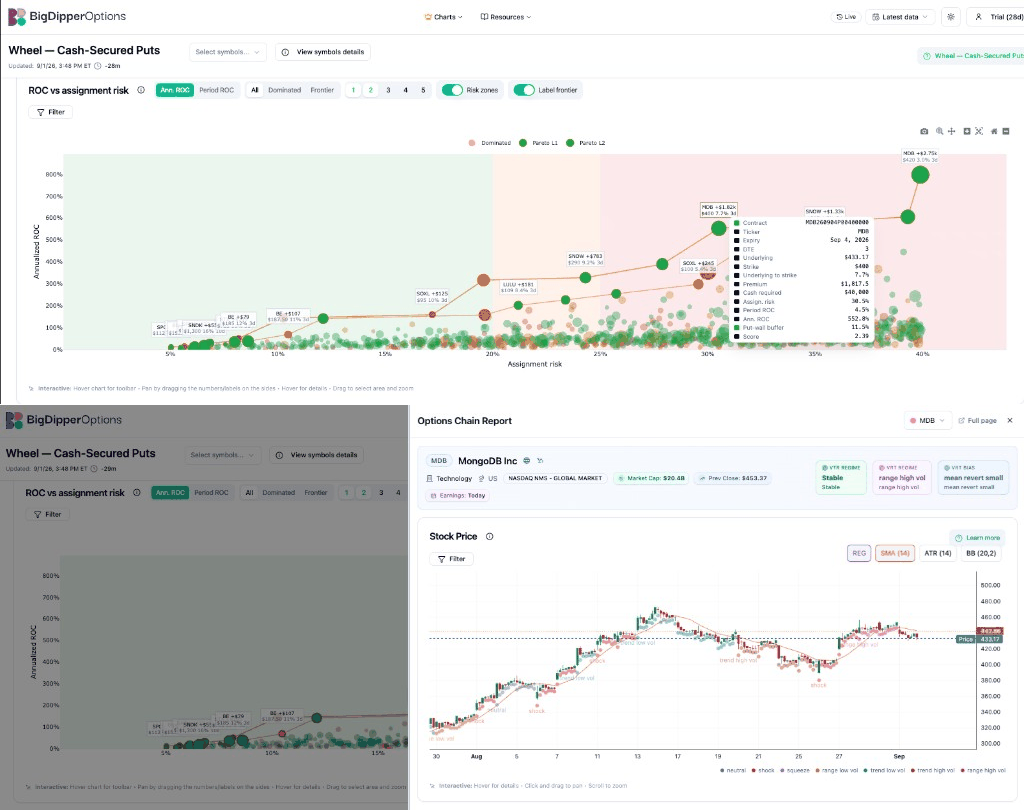 Loops between **hover** (tooltip) and **click** (side panel) on the same MDB dot.
**Hover — tooltip:** Quick reject-or-continue before you leave the scatter. Check **assign. risk**, **cash required**, and **period ROC** vs the headline **ann. ROC**—match your filter and chart toggle.
| Tooltip field | Use it to… |
| - | - |
| **Strike / underlying to strike** | Confirm OTM distance matches your policy |
| **Premium / cash required** | Size the trade vs your cap before clicking |
| **Assign. risk / period & ann. ROC** | Match scatter position to the numbers |
| **Put-wall buffer / score** | First structure read—full context after click |
**Click — side panel:** Opens the [Options Chain Report](/dashboard/navigation-tips) for that symbol. Scroll for price, VRT regime, GEX, walls, and bias—then **reject the symbol** if you would not own it. Here, **Earnings: Today** is a Module 2 fail for many wheel policies even with strong ROC on the dot.
**Typical pass on a frontier dot:**
1. **Hover** — tooltip confirms strike, cash, assignment risk, and ROC fit your filters.
2. **Click** — side panel for ownability (events, regime, structure). **Reject** the symbol if anything fails Module 2.
3. **Next dot** — repeat until 1–2 symbols survive.
4. **CSP table** — verify spread, OI, delta, and live broker quote for the specific strike.
The side panel is a **reject tool**: a dot can look great on ROC but fail on earnings, regime, or walls. Only open the CSP table for symbols you would hold through a drawdown.
Deeper framing: [Module 3 — Execution](/learn/wheel-module-3-execution).
***
## All CSP candidates (table)
Loops between **hover** (tooltip) and **click** (side panel) on the same MDB dot.
**Hover — tooltip:** Quick reject-or-continue before you leave the scatter. Check **assign. risk**, **cash required**, and **period ROC** vs the headline **ann. ROC**—match your filter and chart toggle.
| Tooltip field | Use it to… |
| - | - |
| **Strike / underlying to strike** | Confirm OTM distance matches your policy |
| **Premium / cash required** | Size the trade vs your cap before clicking |
| **Assign. risk / period & ann. ROC** | Match scatter position to the numbers |
| **Put-wall buffer / score** | First structure read—full context after click |
**Click — side panel:** Opens the [Options Chain Report](/dashboard/navigation-tips) for that symbol. Scroll for price, VRT regime, GEX, walls, and bias—then **reject the symbol** if you would not own it. Here, **Earnings: Today** is a Module 2 fail for many wheel policies even with strong ROC on the dot.
**Typical pass on a frontier dot:**
1. **Hover** — tooltip confirms strike, cash, assignment risk, and ROC fit your filters.
2. **Click** — side panel for ownability (events, regime, structure). **Reject** the symbol if anything fails Module 2.
3. **Next dot** — repeat until 1–2 symbols survive.
4. **CSP table** — verify spread, OI, delta, and live broker quote for the specific strike.
The side panel is a **reject tool**: a dot can look great on ROC but fail on earnings, regime, or walls. Only open the CSP table for symbols you would hold through a drawdown.
Deeper framing: [Module 3 — Execution](/learn/wheel-module-3-execution).
***
## All CSP candidates (table)
 ### Purpose
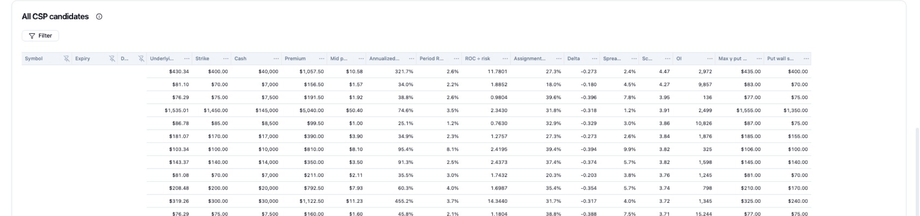
Turn scatter **finalists** into **actionable numbers** for symbols that **survived** the side-panel reject pass: exact strike, credit, capital at risk, liquidity, and structure columns for the puts you might actually sell.
Use the scatter to **shortlist**; use the side panel to **reject symbols**; use the table to **verify you can trade** what remains.
### Potential usage
| Scenario | What to do in the table |
| - | - |
| **Compare 2–3 frontier dots** | Filter or sort to those symbols; pin **Strike**, **Premium**, **Assignment risk**, **Spread %**, **Cash** |
| **Size the trade** | Read **Cash** × contracts vs your per-ticker cap (Module 2) |
| **Liquidity check** | Sort by **Spread %** and **OI**—reject wide spreads even if ROC looks good |
| **Assignment policy** | Sort by **Assignment risk** or **Delta**—confirm it matches how often you want shares |
| **Structure at the put strike** | Glance **Put wall strike** / **Max γ put**—if far from your comfort zone, open [Navigation tips](/dashboard/navigation-tips) for that symbol |
| **Tie-break frontier peers** | Compare **Score** on BigDipperOptions—then confirm **IV / IV Rank** live at broker |
| **Pre-broker sanity check** | Shortlist complete here—confirm **live** premium, IV, and quotes at broker |
### Column reference
| Column | Purpose | Wheel usage |
| - | - | - |
| **Symbol / Expiry / DTE** | Identity and holding period | Match your DTE policy; avoid earnings inside window |
| **Underlying / Strike** | Spot vs where you might own | Strike must be a price you accept in a drawdown |
| **Cash** | Collateral if assigned | Fits account and Module 2 size cap |
| **Premium / Mid price** | Credit (delayed)—verify live | Compare to broker bid; reject if slippage kills edge |
| **Annualized ROC / Period ROC** | Efficiency metrics | Align with scatter view; period ROC for this cycle |
| **ROC ÷ risk** | Combined efficiency score | Secondary sort among finalists |
| **Assignment risk** | Platform assignment estimate | Higher → plan for Phase B sooner |
| **Delta** | Rough ITM / assignment proxy | Cross-check against your delta band |
| **Spread %** | Liquidity | Must be acceptable vs credit collected |
| **Score** | Composite engagement (IV, OI, gamma, …) | Screen here—confirm live IV at broker before order |
| **OI** | Open interest | Minimum bar for entry/exit |
| **Max γ put / Put wall strike** | Downside structure labels | Optional deep dive via chain report |
**Table habits:** scroll horizontally · pin columns · sort by header · paginate. Sort by ROC or assignment risk only **after** ownability and liquidity pass.
***
## All Covered Calls (Phase B)
### Purpose
Turn scatter **finalists** into **actionable numbers** for symbols that **survived** the side-panel reject pass: exact strike, credit, capital at risk, liquidity, and structure columns for the puts you might actually sell.
Use the scatter to **shortlist**; use the side panel to **reject symbols**; use the table to **verify you can trade** what remains.
### Potential usage
| Scenario | What to do in the table |
| - | - |
| **Compare 2–3 frontier dots** | Filter or sort to those symbols; pin **Strike**, **Premium**, **Assignment risk**, **Spread %**, **Cash** |
| **Size the trade** | Read **Cash** × contracts vs your per-ticker cap (Module 2) |
| **Liquidity check** | Sort by **Spread %** and **OI**—reject wide spreads even if ROC looks good |
| **Assignment policy** | Sort by **Assignment risk** or **Delta**—confirm it matches how often you want shares |
| **Structure at the put strike** | Glance **Put wall strike** / **Max γ put**—if far from your comfort zone, open [Navigation tips](/dashboard/navigation-tips) for that symbol |
| **Tie-break frontier peers** | Compare **Score** on BigDipperOptions—then confirm **IV / IV Rank** live at broker |
| **Pre-broker sanity check** | Shortlist complete here—confirm **live** premium, IV, and quotes at broker |
### Column reference
| Column | Purpose | Wheel usage |
| - | - | - |
| **Symbol / Expiry / DTE** | Identity and holding period | Match your DTE policy; avoid earnings inside window |
| **Underlying / Strike** | Spot vs where you might own | Strike must be a price you accept in a drawdown |
| **Cash** | Collateral if assigned | Fits account and Module 2 size cap |
| **Premium / Mid price** | Credit (delayed)—verify live | Compare to broker bid; reject if slippage kills edge |
| **Annualized ROC / Period ROC** | Efficiency metrics | Align with scatter view; period ROC for this cycle |
| **ROC ÷ risk** | Combined efficiency score | Secondary sort among finalists |
| **Assignment risk** | Platform assignment estimate | Higher → plan for Phase B sooner |
| **Delta** | Rough ITM / assignment proxy | Cross-check against your delta band |
| **Spread %** | Liquidity | Must be acceptable vs credit collected |
| **Score** | Composite engagement (IV, OI, gamma, …) | Screen here—confirm live IV at broker before order |
| **OI** | Open interest | Minimum bar for entry/exit |
| **Max γ put / Put wall strike** | Downside structure labels | Optional deep dive via chain report |
**Table habits:** scroll horizontally · pin columns · sort by header · paginate. Sort by ROC or assignment risk only **after** ownability and liquidity pass.
***
## All Covered Calls (Phase B)
 ### Purpose
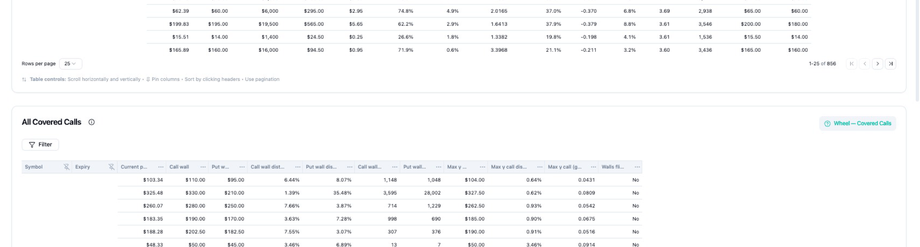
Support **Phase B** of the wheel: you **hold 100 shares per contract** and need a covered-call strike that matches your willingness to sell, premium goals, and market structure.
This block is a **planning and comparison** view—not a substitute for Module 4 management rules (50–70% profit take, rolls, called-away mindset).
### Potential usage
| Scenario | How to use this table |
| - | - |
| **Just assigned on a put** | Find your symbol; compare **call wall** distance vs strikes you would sell |
| **Pre-planning before selling a put** | “If assigned near \$X, where would I sell calls?”—sanity-check Phase B before Phase A |
| **Choosing CC strike** | Balance **call wall distance** (room to run) vs premium—you **cap upside** on purpose |
| **Avoiding bad CC strikes** | **Walls fit** and wall distances flag structural mismatch—still verify on chain report |
| **Rotation after call-away** | After shares are called away, return to CSP scatter/table for the next put cycle |
### Column reference
| Column | Purpose | Wheel usage |
| - | - | - |
| **Current price** | Spot vs walls | Anchor for strike selection |
| **Call wall / Put wall** | Concentration levels | CC often discussed relative to call wall; put wall for context |
| **Wall distances** | % from spot to each wall | See how much room before structural levels |
| **Wall volumes** | Activity at walls | Heavier levels = more discussed, not guaranteed |
| **Max γ / distances** | Gamma hotspots | Manage DTE and strike with chop in mind |
| **Walls fit** | Platform alignment flag | One input—combine with your sell discipline |
Full lifecycle: [Module 4 — Lifecycle](/learn/wheel-module-4-lifecycle) · [Lifecycle decision map](/learn/wheel-module-4-lifecycle#1-wheel-lifecycle-at-a-glance).
***
## Putting the three blocks together
```text theme={null}
Module 2 policy (ownability, DTE, delta, size)
↓
Select symbols (header) → watchlist scope
↓
Scatter Filter → DTE · Cash · Assignment risk · ROC · Premium · Score
↓
Scatter view → Frontier · hover tooltip · click → side panel (reject symbols)
↓
CSP table → verify credit, cash, spread, OI, assignment risk
↓
Module 3 checklist → reject until ≤1 remains
↓
Broker → live underlying + option premium → order
↓
(If assigned) Covered calls table → Phase B strike planning
↓
Module 4 journal + management rules
```
***
## Suggested workflow (with Module 3)
1. **[Module 2](/learn/wheel-module-2-candidates)** — reject tickers you would not own; note DTE, delta, and size caps.
2. **Select symbols** — set header watchlist.
3. **Scatter Filter** — copy a stack from [Filtering the Wheel page](/dashboard/wheel-page-guide#filtering-the-wheel-page) or build your own.
4. **Scatter view** — frontier + risk zones; **hover** dots, **click** finalists to deep-analyze and reject symbols in the side panel.
5. **CSP table** — verify spread, OI, delta for symbols that passed; use table Filter if needed.
6. **Options Chain Report** (optional) — full-page deep dive via [Navigation tips](/dashboard/navigation-tips) when you need more room than the side panel.
7. **Pre-trade checklist** — [Module 3](/learn/wheel-module-3-execution#pre-trade-checklist-printable).
8. **Reject** until at most one remains.
9. **Broker** — confirm live underlying, strike, and option premium.
10. **Journal** — [Module 4](/learn/wheel-module-4-lifecycle#8-journal-keep-using-it).
***
## Related docs
| Doc | Purpose |
| - | - |
| [Navigation tips](/dashboard/navigation-tips) | Options Chain Report UI |
| [Key metrics explained](/dashboard/key-metrics-explained) | Walls, max gamma, score labels |
| [Wheel Learning Series](/learn/wheel-complete-guide) | Full wheel curriculum hub |
| [Module 2 — Candidates](/learn/wheel-module-2-candidates) | Screening before the Wheel page |
| [Module 3 — Execution](/learn/wheel-module-3-execution) | Reject drill and checklist |
| [Module 4 — Lifecycle](/learn/wheel-module-4-lifecycle) | After entry; covered calls phase |
This documentation is built and hosted on [Mintlify](https://mintlify.com), a developer documentation platform.
### Purpose
Support **Phase B** of the wheel: you **hold 100 shares per contract** and need a covered-call strike that matches your willingness to sell, premium goals, and market structure.
This block is a **planning and comparison** view—not a substitute for Module 4 management rules (50–70% profit take, rolls, called-away mindset).
### Potential usage
| Scenario | How to use this table |
| - | - |
| **Just assigned on a put** | Find your symbol; compare **call wall** distance vs strikes you would sell |
| **Pre-planning before selling a put** | “If assigned near \$X, where would I sell calls?”—sanity-check Phase B before Phase A |
| **Choosing CC strike** | Balance **call wall distance** (room to run) vs premium—you **cap upside** on purpose |
| **Avoiding bad CC strikes** | **Walls fit** and wall distances flag structural mismatch—still verify on chain report |
| **Rotation after call-away** | After shares are called away, return to CSP scatter/table for the next put cycle |
### Column reference
| Column | Purpose | Wheel usage |
| - | - | - |
| **Current price** | Spot vs walls | Anchor for strike selection |
| **Call wall / Put wall** | Concentration levels | CC often discussed relative to call wall; put wall for context |
| **Wall distances** | % from spot to each wall | See how much room before structural levels |
| **Wall volumes** | Activity at walls | Heavier levels = more discussed, not guaranteed |
| **Max γ / distances** | Gamma hotspots | Manage DTE and strike with chop in mind |
| **Walls fit** | Platform alignment flag | One input—combine with your sell discipline |
Full lifecycle: [Module 4 — Lifecycle](/learn/wheel-module-4-lifecycle) · [Lifecycle decision map](/learn/wheel-module-4-lifecycle#1-wheel-lifecycle-at-a-glance).
***
## Putting the three blocks together
```text theme={null}
Module 2 policy (ownability, DTE, delta, size)
↓
Select symbols (header) → watchlist scope
↓
Scatter Filter → DTE · Cash · Assignment risk · ROC · Premium · Score
↓
Scatter view → Frontier · hover tooltip · click → side panel (reject symbols)
↓
CSP table → verify credit, cash, spread, OI, assignment risk
↓
Module 3 checklist → reject until ≤1 remains
↓
Broker → live underlying + option premium → order
↓
(If assigned) Covered calls table → Phase B strike planning
↓
Module 4 journal + management rules
```
***
## Suggested workflow (with Module 3)
1. **[Module 2](/learn/wheel-module-2-candidates)** — reject tickers you would not own; note DTE, delta, and size caps.
2. **Select symbols** — set header watchlist.
3. **Scatter Filter** — copy a stack from [Filtering the Wheel page](/dashboard/wheel-page-guide#filtering-the-wheel-page) or build your own.
4. **Scatter view** — frontier + risk zones; **hover** dots, **click** finalists to deep-analyze and reject symbols in the side panel.
5. **CSP table** — verify spread, OI, delta for symbols that passed; use table Filter if needed.
6. **Options Chain Report** (optional) — full-page deep dive via [Navigation tips](/dashboard/navigation-tips) when you need more room than the side panel.
7. **Pre-trade checklist** — [Module 3](/learn/wheel-module-3-execution#pre-trade-checklist-printable).
8. **Reject** until at most one remains.
9. **Broker** — confirm live underlying, strike, and option premium.
10. **Journal** — [Module 4](/learn/wheel-module-4-lifecycle#8-journal-keep-using-it).
***
## Related docs
| Doc | Purpose |
| - | - |
| [Navigation tips](/dashboard/navigation-tips) | Options Chain Report UI |
| [Key metrics explained](/dashboard/key-metrics-explained) | Walls, max gamma, score labels |
| [Wheel Learning Series](/learn/wheel-complete-guide) | Full wheel curriculum hub |
| [Module 2 — Candidates](/learn/wheel-module-2-candidates) | Screening before the Wheel page |
| [Module 3 — Execution](/learn/wheel-module-3-execution) | Reject drill and checklist |
| [Module 4 — Lifecycle](/learn/wheel-module-4-lifecycle) | After entry; covered calls phase |
This documentation is built and hosted on [Mintlify](https://mintlify.com), a developer documentation platform.